Upload a signed IPA. Send testers an install link.
DistKit is an IPA distribution platform for iOS beta testing. You upload an Ad Hoc or enterprise-signed IPA; DistKit reads its version, Bundle ID, and signing type, then generates an itms-services install link and QR code. Testers open the link in Safari and install over the air — no review queue, no cables.
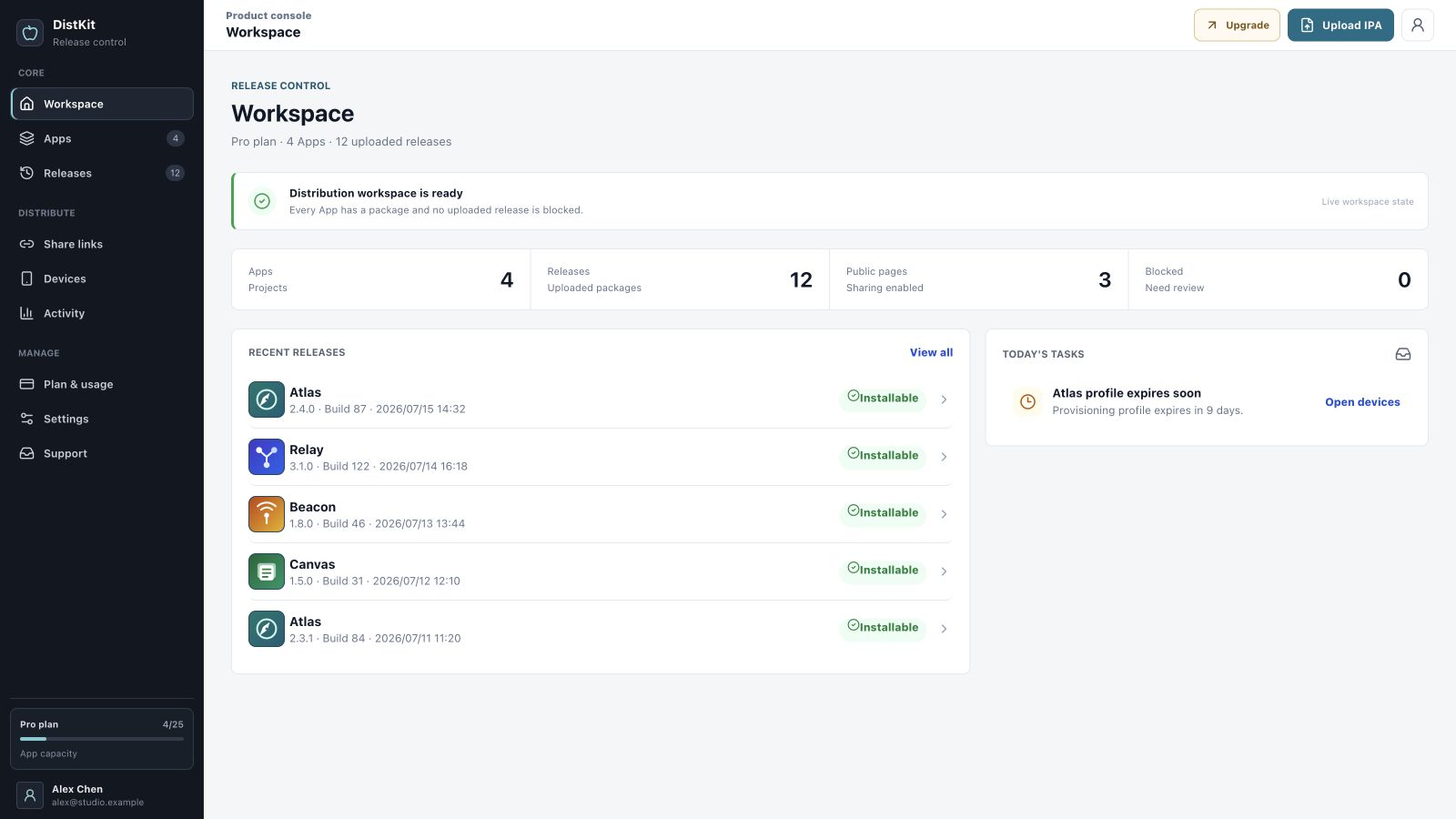
The DistKit workspace console
From signed IPA to installed app
You handle the signing; DistKit handles everything after.
Drop in the .ipa
Drag a signed IPA — Ad Hoc or enterprise (In-House) — into the console.
DistKit reads the build
Version, build number, Bundle ID, signing type, and provisioning-profile expiry are extracted automatically. Unsigned or expired builds are rejected.
Get a controlled link
Each release gets an itms-services install link and QR code. Per link you can set a password, an expiry date, and an install cap.
Tester taps Install
The link opens in Safari on the device; iOS installs the build over the air. No companion app on the tester's phone.
Built for QA rounds, client demos, internal apps
QA teams
Push nightly or per-ticket builds without waiting on any review. Each release keeps its version and build number visible on the download page, so "which build are you on?" always has an answer.
Client demos
Send a password-protected link that expires when the demo window closes. The client scans a QR code in the meeting — no TestFlight invitation emails, no Apple ID handoff.
Enterprise internal apps
Distribute In-House-signed builds to employees behind expiring links, and take a release offline the moment it is superseded or a certificate is rotated.
DistKit vs TestFlight vs Diawi
Each tool earns its place. The honest version of the comparison:
| DistKit | TestFlight | Diawi | |
|---|---|---|---|
| Wait before testers install | None — upload, share, install | Beta App Review required for external testers | None |
| Build lifetime | Your provisioning profile's expiry, shown at upload | 90 days per build, then it stops launching | Free uploads expire after a short retention period |
| Link controls | Password, expiry date, and install cap per link | Managed tester groups in App Store Connect | Password protection; expiry and management vary by plan |
| Account & history | Email-verified account, per-app release history | Apple Developer Program membership | Optional accounts add a dashboard; deeper history is plan-dependent |
| Device reach | Ad Hoc: devices in your profile. Enterprise: your organization's devices | Up to 10,000 external testers, no UDID registration | Devices in your provisioning profile |
| Best for | Managed OTA beta distribution outside the App Store track | App Store-bound betas at scale | One-off quick shares |
Shipping to the App Store with thousands of external testers? Use TestFlight. DistKit covers the ground before and around it: fast internal loops, client-facing builds, and enterprise packages that were never going to the App Store.
Full comparison: DistKit vs TestFlight →
Full comparison: DistKit vs Diawi →
Security and compliance as a feature
Gray-market signing services gave OTA distribution a bad name. DistKit's answer is a hard scope line, enforced in the product.
- Signed builds only DistKit parses every upload's provisioning profile. Unsigned, expired, or App Store-signed IPAs are rejected. There is no resigning, no "free signing", no "super signature", and no enterprise certificate rental — by policy, not by roadmap.
- Report & takedown Every public download page carries a report entry point. Takedown is a first-class release state, not a support ticket.
- Verified publishers Publishing requires an email-verified account. There are no anonymous uploads, so every hosted build traces back to an owner.
- Controlled exposure Links can require a password, expire on a date, or stop after a set number of installs — the default posture is "shared with someone", not "public to everyone".
Common questions about DistKit
Do testers need to install anything first?
No. The install link opens in Safari and uses iOS's built-in itms-services over-the-air installation. No companion app, no cable, and no Apple ID sign-in on the tester's side.
Which IPAs can I upload to DistKit?
Ad Hoc or enterprise (In-House) signed IPAs. DistKit parses the embedded provisioning profile and rejects unsigned, expired, or App Store-signed builds at upload time.
Why do some devices fail with "Unable to install"?
With Ad Hoc signing, a device must be registered in the provisioning profile by UDID. DistKit shows the signing type and profile expiry on each release so you can check before sharing. Enterprise-signed builds do not have this per-device restriction.
Is DistKit a TestFlight replacement?
For beta distribution it removes the Beta App Review wait and the 90-day build expiry. For submitting to the App Store you still use App Store Connect — DistKit does not touch that pipeline.
Does DistKit resign apps or offer "free signing"?
No. DistKit only distributes builds you signed yourself. Signature bypasses, "super signatures", and enterprise certificate rental are explicitly out of scope by policy.
What does DistKit cost?
Free: 2 apps, 5 releases per app, 200 downloads per month, 512 MB storage. Pro: $19/month with 25 apps, 50 releases per app, 10,000 downloads per month, 10 GB. Business: $79/month with 100 apps, 100 releases per app, 100,000 downloads per month, 100 GB.
Pricing: start free, upgrade at $19
Free
- 2 apps
- 5 releases per app
- 200 downloads / month
- 512 MB storage
Pro
- 25 apps
- 50 releases per app
- 10,000 downloads / month
- 10 GB storage
Business
- 100 apps
- 100 releases per app
- 100,000 downloads / month
- 100 GB storage
Full plan details and upgrades live at dist.panyue.xyz/pricing.
Your next build, installable in minutes
Create a free account, upload a signed IPA, and scan the QR code with your own phone. If it doesn't install, you've lost five minutes.
Start free — 2 apps included